
Waveline
A Wave Link-style audio mixer for Linux, for any microphone.
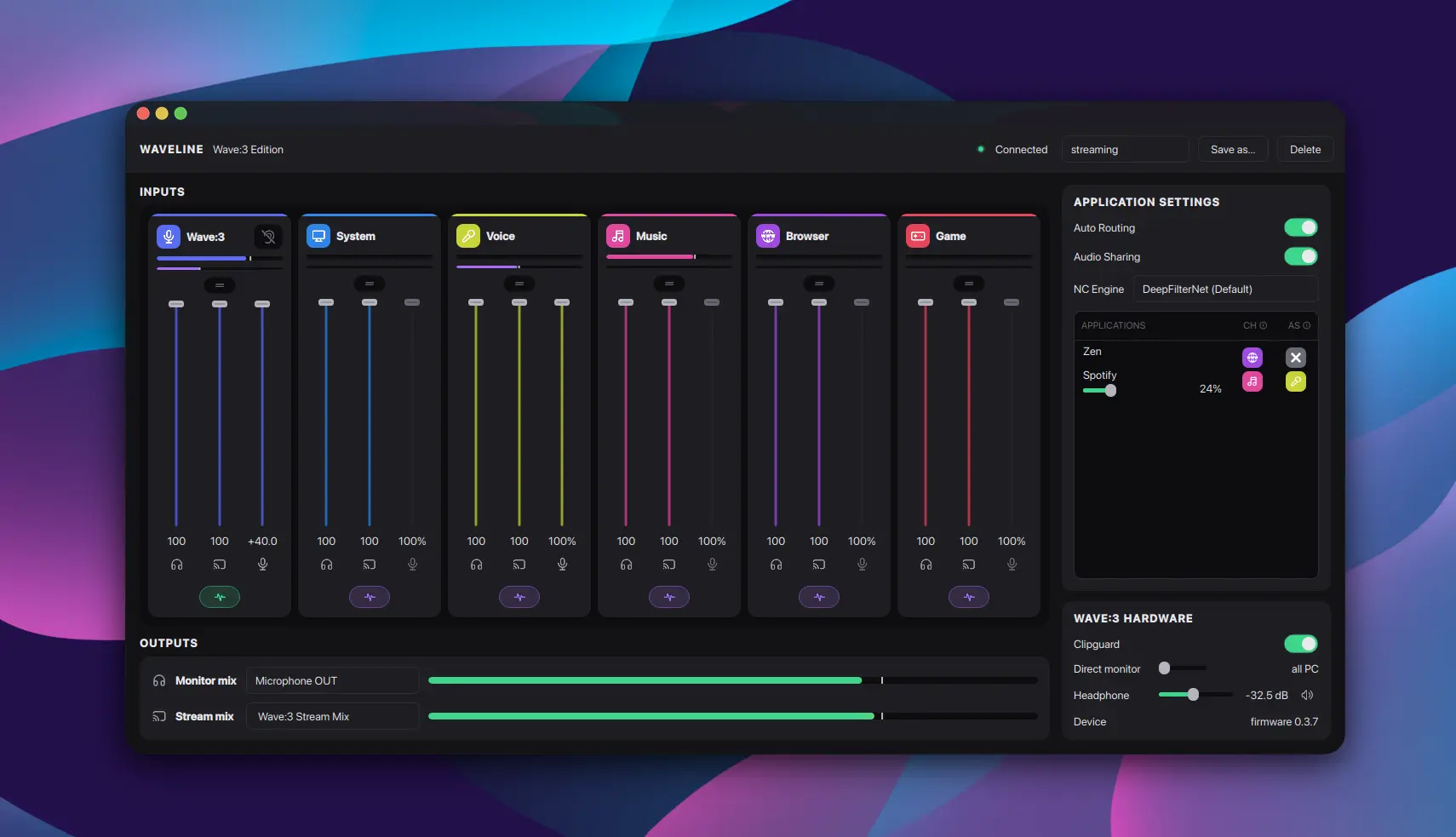
Waveline gives you what streaming mixers give you on Windows — named channels, a separate Stream mix and Monitor mix, per-application routing, noise suppression, EQ and dynamics — built directly on PipeWire, with no proprietary software and no device lock-in.
None of that is device-specific. What is device-specific — a kernel quirk, a
WirePlumber workaround, a vendor USB protocol — lives in a profile under
devices/, and only the profiles matching hardware you actually
have plugged in get installed.
Licensed GPL-2.0-or-later. See LICENSE.
Install
Requirements
- A PipeWire-based desktop (PipeWire + WirePlumber)
- Qt 6.4+, CMake 3.21+, a C++20 compiler
librnnoise,libpipewire-0.3- Kernel headers matching the running kernel (only for the DKMS part)
Supported distro families: Arch, Fedora / RHEL, Debian / Ubuntu. The installer pulls its own build dependencies on those.
Not supported: atomic / image-based distros (Silverblue, Kinoite, Bazzite, SteamOS, openSUSE MicroOS). DKMS there needs
rpm-ostreelayering or a systemd sysext, and the installer would not do the right thing.
Quick start
git clone https://github.com/Nakildias/waveline.git
cd waveline
sudo ./install.sh
Then open the mixer:
waveline-mixer
The daemon (wavelined) is enabled and started at the end of the run, so the
mixer works straight afterwards with nothing else to type.
What the installer does
| Step | What it installs |
|---|---|
| 1. Kernel patch | Per matched profile, via DKMS. The Elgato Wave:3 needs one (it fixes the usb_set_interface -110 lockup); most microphones need none, and then this step does nothing. |
| 2. WirePlumber | Per matched profile |
| 3. PipeWire | Per matched profile |
| 4. Hardware CLI | waveline-hw, for controls ALSA does not expose. Only when a matched profile has a vendor protocol. |
| 5. Mixer | wavelined + waveline-mixer, built from source |
| 6. DeepFilterNet | Optional. The better noise-suppression engine, and the default. Built from upstream Rust sources because no distro packages libDF's C API. |
Steps 2–6 are pure userspace and work on any kernel. Step 1 needs matching kernel headers; if that is not possible the installer says so and still installs everything else.
Step 6 is the slow one: it downloads a Rust crate graph and compiles it — a few minutes and ~1 GB of scratch space, removed afterwards.
Options
sudo ./install.sh --app-only    # rebuild + install waveline-mixer only
sudo ./install.sh --help
| Environment variable | Effect |
|---|---|
WAVELINE_PROFILES="wave3" |
Install a profile's parts without that device plugged in |
WAVELINE_NO_AUTOSTART=1 |
Install, but do not enable/start wavelined |
WAVELINE_PRO_AUDIO=1 |
Install the Wave:3 Pro Audio quantum fix (adds ~85 ms latency system-wide — say no unless you route the mic through a DAW in Pro Audio) |
WAVELINE_SKIP_DFN=1 |
Skip building DeepFilterNet; the mixer falls back to RNNoise |
Uninstall
sudo ./uninstall.sh
Removes the DKMS module, every profile's drop-ins and udev rules, the binaries
and the services, then reloads the audio stack. Build dependencies are
deliberately left alone. It refuses to unload the patched module unless a stock
snd-usb-audio is available to replace it, so you cannot end up with no USB
audio driver at all.
Features
Mixing and routing
- Named channels — System, Voice, Music, Browser, Game, SFX — renameable, each with its own level, mute and effects.
- Dual mixes. A Stream mix (a virtual recording device your streaming software captures) and a Monitor mix (what you hear), balanced independently per channel.
- Up to 5 Monitor mix outputs, each with its own destination, level and mute — headphones and speakers at once, at different volumes.
- Multiple input devices. Add, remove and rebuild capture devices live; channels follow.
- Per-application routing. Move any playing application onto a channel by hand, or let auto-routing place it by name (Discord → Voice, Spotify → Music).
- Sound sharing. Send an application's audio into the microphone stream, so the people you're talking to hear it — with its own independent level.
- MIDI input with a FluidSynth instrument backend.
Processing
- Noise suppression — DeepFilterNet (default when available) or RNNoise, switchable at runtime, with a strength control.
- Per-channel and per-device effects: low-cut filter, three-band EQ, de-esser.
- Dynamics: noise gate, compressor with ratio and auto makeup gain, and a limiter with an adjustable ceiling.
- Ducking — pull other channels down when you speak or when another channel is playing audio.
- LUFS limiter / ear protection — caps application loudness using a BS.1770-style meter, so a loud video does not remove your hearing.
- Creative FX: reverb, overdrive, delay.
Around the mixer
- Profiles. A profile is a whole mixer setup — levels, mutes, routing, effects. Save, rename, switch, import and export them. Switching a profile never rewires the graph.
- Web Companion. A built-in server serves a small PWA to any phone or tablet on your network; use it as a second control surface. The page is compiled into the daemon, so it cannot go missing.
- Instrument tuner. Tune from any audio or MIDI input, auto or manual string mode, selectable concert pitch — without disturbing your mixer setup.
- Hardware controls for microphones that expose them over a vendor USB protocol (Elgato Wave:3: Clipguard, direct-monitor blend, headphone jack).
- Daemon/GUI split.
wavelinedowns the PipeWire graph and the noise filter; the GUI is a pure D-Bus client. Closing the window leaves routing and noise suppression running. - Update check in the About window.
Hardware profiles in-tree
| Vendor | Device | Path |
|---|---|---|
| Elgato | Wave:3 | devices/elgato/microphones/wave3/ |
| Elgato | 4K60 Pro MK.2 | devices/elgato/capture-cards/4k60mk2/ |
| Elgato | 4K Pro | devices/elgato/capture-cards/4kpro/ |
| Logitech | C922 | devices/logitech/microphones/c922/ |
| OBSBOT | Meet 4K | devices/obsbot/microphones/meet4k/ |
| Antlion | ModMic | devices/antlion/microphones/modmic/ |
| Misc | Rocksmith guitar adapter | devices/misc/mixers/rocksmith/ |
| — | Generic fallback | devices/generic/ |
Anything not listed still works through the generic profile — the mixer itself is not device-specific.
Contributing
Issues and pull requests: https://github.com/Nakildias/waveline.
Everything is SPDX-License-Identifier: GPL-2.0-or-later; keep the header on
new files. Contributions are accepted under that licence.
Adding a new device
devices/README.md is the full guide — read it first.
devices/ is the only place new hardware support belongs. Profiles are
discovered automatically, so a normal new mic, mixer or capture card needs no
installer edits.
The short version:
- Identify the hardware with it plugged in —
lsusb,lspci -nn,pw-cli ls Node,wpctl status,cat /proc/asound/cards. Never invent USB/PCI IDs, ALSA node names, or quirks. - Create the profile tree:
bash mkdir -p devices/<brand>/<category>/<id> cp devices/generic/device.conf devices/<brand>/<category>/<id>/device.conf<category>ismicrophones,capture-cardsormixers.PROFILE_IDmust equal the directory name. - Fill in
device.conf—PROFILE_ID,PROFILE_LABEL,BRAND,USB_IDS/PCI_IDS,ALSA_NODE_MATCH. Leave the optional keys empty. Add the capture node prefix and display brand toapp/src/engine/masterbus.hso strips are named correctly. - Add WirePlumber / PipeWire / udev / kernel drop-ins only with evidence that they are needed. Never copy another device's workarounds onto hardware that does not need them.
- Smoke-test discovery with
scripts/lib/profiles.sh(profile_resolve,profile_present,profile_detect) — see the guide. - Test on real hardware. "Config looks right" is not support.
Two more documents are required reading before you post a profile:
devices/TROUBLESHOOTING.md— evidence-driven guide for intermittent robotic / metallic / pitch-shifted capture audio.devices/VERIFY_BEFORE_POSTING.md— the human verification matrix: 20 daemon startups, 20 physical hotplugs per device, and 20 Rebuild actions per device, with ≥99% success in every category. A human must run this; an agent cannot sign it off.
Using an AI agent to add your device
Paste this into Claude / Cursor with the device plugged in:
Read
devices/README.md,devices/TROUBLESHOOTING.md, anddevices/VERIFY_BEFORE_POSTING.mdin this repo end-to-end. Add Waveline support for my hardware: <full product name> (microphone / mixer / capture card). Follow the layout, filldevice.confcorrectly, add WirePlumber / udev / kernel bits only if evidence shows they are needed, run the agent testing checklist yourself, then walk me through the required human verification and wait for my results before calling it done.
Opening the PR
Include, in the description:
- Full product name and the
vid:pid/[vid:pid]you found - The output that proves detection (
profile_detect,wpctl status) - Which optional drop-ins you added and the evidence that made them necessary
- Your results from
VERIFY_BEFORE_POSTING.md - Any known gaps you are asking to have accepted
What not to do
- Do not create empty category folders "for later".
- Do not set
HARDWARE_CONTROLS=1without a real vendor protocol in the daemon. - Do not change
install.shfor a normal new profile — discovery is automatic. - Do not commit secrets or machine-specific paths in
device.conf.
Thanks, and third-party licences
Waveline stands on other people's work. A full, per-component inventory —
including why each licence is compatible with GPL-2.0-or-later, and how each
component reaches you — is in THIRD-PARTY.md. Verbatim
licence texts are in LICENSES/.
| Project | Licence | How it reaches you |
|---|---|---|
| PipeWire | MIT | Linked at build time against the system libpipewire-0.3. The whole mixer is built on it. |
| RNNoise — Jean-Marc Valin, Xiph.Org, Mozilla, Amazon, Mark Borgerding | BSD-3-Clause | Linked at build time against the system librnnoise. Not redistributed here. |
| DeepFilterNet — Hendrik Schröter | MIT or Apache-2.0 (taken under MIT) | dlopened at runtime from the system libdf.so. Not redistributed here and not a build dependency. |
| tract — Sonos | MIT / Apache-2.0 | Inside libDF; runs the DeepFilterNet model. Not this project's to convey. |
| Qt 6 | LGPL-3.0-only | Linked at build time against the system Qt. This is why Waveline is GPL-2.0-or-later — see THIRD-PARTY.md. |
| FluidSynth | LGPL-2.1-or-later | Optional MIDI instrument backend, dlopened at runtime (or linked if a copy is present in app/lib/). |
| Tabler Icons — © 2020–2026 Paweł Kuna | MIT | Copied into this repository under app/src/icons/ and compiled into waveline-mixer. LICENSES/TablerIcons-MIT.txt must travel with any copy of this repo or a binary built from it. |
Linux kernel snd-usb-audio |
GPL-2.0-only | scripts/prepare-src.sh patches the kernel's own sources; the resulting DKMS module is a derivative of the kernel and is conveyed as GPL-2.0-only. |
| sc0710 — originally stoth68000/sc0710, Steven Toth | GPL-2.0 | Elgato 4K60 Pro MK.2 / 4K Pro PCIe capture driver, used alongside the capture-card profiles. |
The interface is modelled on Elgato's Wave Link. Waveline is not affiliated with, endorsed by, or derived from Elgato or Corsair; no Elgato code or assets are included, and product names are used only to identify hardware.
Nothing on this page is legal advice — it is a factual inventory so that you, or anyone packaging this, can comply without re-deriving it.